# Operating washes
This sequence takes you from the selection of a wash program to its execution and completion. Should any error occur within the machine during operation, all details will be recorded inside the Error Log screen, on which you'll find both the error and the relative suggested solution.
# 1. Wash program selection
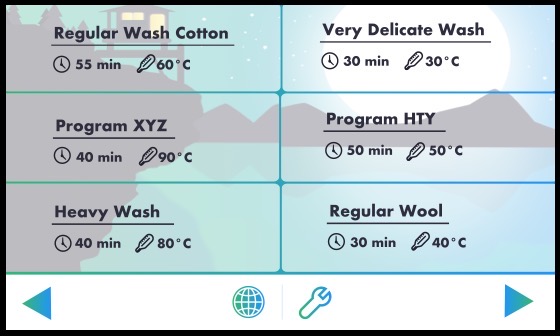
Within this screen, you can see up to six wash programs and you can easily scroll further to see all the others available. Each program card displays the name of the wash program, assigned during its creation with the Wash Configurator, and other useful information such as the total time and the maximum temperature reached within the wash cycle. In order to select a program, simply tap on a program card. A stylish popup will appear giving you more information about the program tapped and you can easily launch it or close the popup and select another one.
# 2. Wash program launch
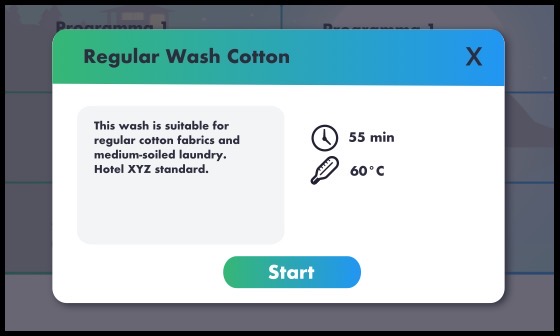
This is the popup describe briefly in the previous paragraph: it contains a full description of the program alonside other relevant information such as total expected duration and maximum temperature reached during the wash cycle. If you want to proceed with starting the wash, simply tap the "Start" button, otherwise close the popup using the exit icon in the top right corner. If you close the popup, you'll find yourself back into the wash program selection screen.
# 3. Wash program running
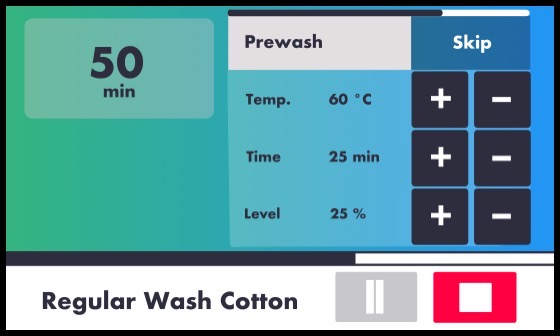
This screen contains all the information regarding the status of the wash that is running:
- in the top left corner, you have the countdown of the remaining time till wash completion
- next to it, on the right, there's the current cycle, its progress bar on the top of the block and its values of temperature, time and water level. You can operate on this either deciding to skip the cycle altogether by tapping the "skip" button or by increasing or decresing the values of temperature, time and level. For instance, if you would like this cycle to last longer, you can increase the time value by pressing the "plus" icon. On the same line, if you would like this cycle to just reach a lower water level, you can decrease the level value by pressing the "minus" icon.
- the bottom bar contains the wash name and two operative buttons, the gray one is for pausing the wash and the red one is for stopping the wash altogether. At the top of the bottom bar you can see the wash progress bar, visually indicating the progress of the wash program.
← Settings Maintenance →